Twitter Updates

Showing posts with label Visio. Show all posts

Wednesday, 24 February 2010

Disable Visio Auto Connect

I think it was in Visio 2007 a new feature called auto connect was added which adds blue triangles on the side of visio objects (Shown in image below) and if pressed will auto connect to some other object/shape. This can get quite furstrating as they are very easy to accidentally click.
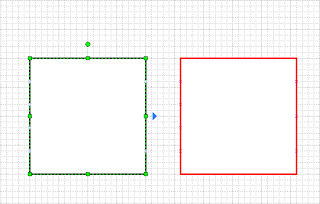


To switch off this feature choose:
Visio -> Tools -> Options -> General Tab
Deselect the 'Enable AutoConnect' option

Friday, 31 July 2009

Word Visio Stop capitilisation

Finally got around to switching off first letter capitalisation (capitalization) For word 2007 and visio 2003.

The options are in the AutoCorrect Menus if you know how to find them. Microsofts instructions for Visio are here:
http://support.microsoft.com/kb/290586

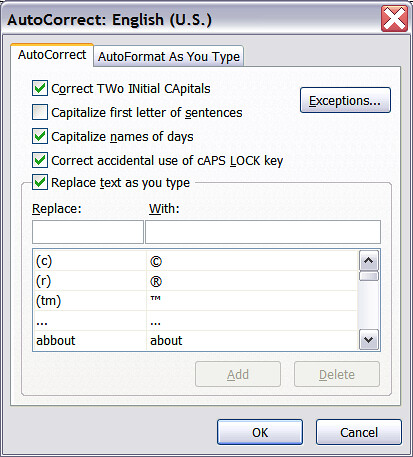
Basically, Visio -> Tools -> AutoCorrect Options, DeSelect "Capitalize first letter of sentences"

StopVisio2003ManglingYourText

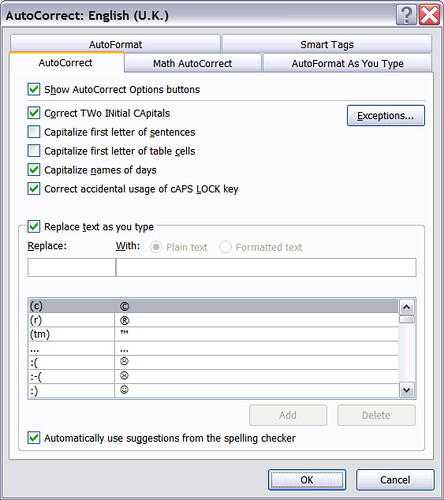
For Word 2007 I had to make the mistake then select the smart tag to get to the Auto correct options. but then the options were very similar to Visio.

StopWord2007ManglingYourText

Friday, 16 January 2009

Visio Grid

When zooming in and out Visio changes the grid size by default, it would be nice if it did this in powers of 2, so things would still be alligned on finer settings but no, it is fractional and changing zoom can move objects off the grid.

The simplest soloution is to use a fixed grid.
Viso -> Tools -> Ruler & Grid
Set
Horizontal Grid Spacing = fixed
Vertical Grid Spacing = fixed
Horizontal Minimum spacing 5 mm
Vertical Minimum spacing 5 mm


Source http://office.microsoft.com/en-us/visio/HP012313791033.aspx

Monday, 20 October 2008

MS Visio Block Connection Points

In Visio it is easy to move and add extra connection points to an object.

Just select the 'Connection Point Tool' from the drop down menu next to the normal arrow tool.


You can then click and drag the pre-drawn connection points or CTRL-Left click add new connection points